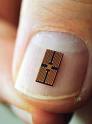
CPU (Central Processing Unit)
A CPU is considered as the brain of the computer. It indeed is, because all the controlling and "thinking" works are done by this part of the computer. Early computers needed to be physically wired again and again in order to perform different tasks, but with the introduction of stored program architecture of computers, the whole definition of CPU was redefined.
The introduction of the microprocessor in the 1970s significantly affected the design and implementation of CPUs. Since the introduction of the first commercially available microprocessor in 1970, this class of CPUs has almost completely overtaken all other central processing unit implementation methods. Combined with the vast success of personal computers, the term "CPU" is now applied almost exclusively to microprocessors.

Monitor
fig.: A CPU
A monitor or screen or visual display unit(VDU) displays the inputs that is being fed to the computer, and the outputs the computer generates. Monitors were part of the computer only from 1970s, and since then, they have observed a vast variety in size, price and capabilities.

fig. A modern monitor
There are various types of monitors, each with their own features. Following are the types of monitors:
CRT monitor
A CRT (Cathode Ray Tube) monitor consists of a "cathode ray tube" at the back of it. It supports high dynamic range (up to around 15,000:1), excellent color, wide gamut (set of colors) and low black level (evel of brightness at the darkest (black) part of a visual image). It can display natively in almost any resolution and refresh rate. It does not have input lag, response time is sub-milliseconds and almost zero color, saturation, contrast and brightness distortion.
On the contrary, CRT monitors usually have large size and weight, especially for bigger screens, high power consumption and produce noticeable flicker at low refresh rates.
 fig: CRT monitor
CRT monitor
A CRT (Cathode Ray Tube) monitor consists of a "cathode ray tube" at the back of it. It supports high dynamic range (up to around 15,000:1), excellent color, wide gamut (set of colors) and low black level (evel of brightness at the darkest (black) part of a visual image). It can display natively in almost any resolution and refresh rate. It does not have input lag, response time is sub-milliseconds and almost zero color, saturation, contrast and brightness distortion.
On the contrary, CRT monitors usually have large size and weight, especially for bigger screens, high power consumption and produce noticeable flicker at low refresh rates.
 fig: CRT monitor
LCD monitor
LCD monitors are famous for being very compact, light weight and small size. They have lower rate of power consumption, no geometric distortion and little or no flicker depending on backlight technology.
LCD monitors have limited viewing angles, which cause color, saturation, contrast and brightness to vary, by the variations in posture. They have slow response time, only one native resolution, and dead pixels may occur during manufacturing or through use.

fig: LCD monitor
LCD monitors are famous for being very compact, light weight and small size. They have lower rate of power consumption, no geometric distortion and little or no flicker depending on backlight technology.
LCD monitors have limited viewing angles, which cause color, saturation, contrast and brightness to vary, by the variations in posture. They have slow response time, only one native resolution, and dead pixels may occur during manufacturing or through use.

fig: LCD monitor
Plasma monitor
Plasma monitors are compact and light, with high contrast ratios (10,000:1 or higher), excellent color, wide gamut (set of colors), and low black level. They also have high speed response, almost zero color, saturation, contrast or brightness distortion, excellent viewing angle and no geometric distortion.
On the other hand, they have large pixel pitch, which means that the resolution is either low or a large screen is necessary. Flicker is noticeable when viewed at close range. Operating temperature and power consumption are high and only one native resolution is supported. They have noticeable input lag, and dead pixels are possible during manufacturing.

fig: Plasma monitor
Plasma monitors are compact and light, with high contrast ratios (10,000:1 or higher), excellent color, wide gamut (set of colors), and low black level. They also have high speed response, almost zero color, saturation, contrast or brightness distortion, excellent viewing angle and no geometric distortion.
On the other hand, they have large pixel pitch, which means that the resolution is either low or a large screen is necessary. Flicker is noticeable when viewed at close range. Operating temperature and power consumption are high and only one native resolution is supported. They have noticeable input lag, and dead pixels are possible during manufacturing.

fig: Plasma monitor
Mouse
A mouse is a pointing device with two or more buttons on it. It sometimes consists of other features like wheel that allows a user to perform various system-dependent operations, or add more control or dimensional input. The motion of the mouse is corresponded to the motion of a cursor on the screen, known as "mouse pointer", allowing a fine control of the Graphical User Interface (GUI).
 The name mouse, which originated at the Stanford Research Institute , is derived from the resemblance of early models (which had a cord attached to the rear part of the device, suggesting the idea of a tail) to the common mouse.
Types of mouse
There are many types of mice so far. Most common of them are mechanical mouse, optical mouse and inertial mouse.
Mechanical mouse

A mechanical mouse consists of two rollers rolling against two sides of the
central rubber ball. One roller detects the forward–backward motion of
the mouse and other detects the left–right motion. The motion of
these two rollers causes two disc-like encoder wheels to rotate, interrupting
optical beams to generate electrical signals. The mouse sends these signals
to the computer system by means of connecting wires, or wirelessly
through bluetooth. The driver software in the system converts the
signals into motion of the mouse cursor along X and Y axes on the screen.
Optical mouse
An optical mouse utilizes light emitting diodes and photo-diodes to detect the movements relative to the underlying surface, instead of moving a part of it, as in a mechanical mouse.
 An optical mouse uses optoelectronic sensors to take successive images of the surface on which the mouse operates. With the improvement on the image processing technologies, modern mice are equipped with the image processing chips itself, embeded into them. This give them the ability to detect the motion on a wide variety of surfaces, translating the movement of the mouse into the movement of the mouse pointer and eliminating the need for a special mouse-pad. Using light emitting diodes (LED) or laser diodes, optical mice illuminate the surface under them. Changes between two consecutive frames are processed by the image processing part of the chip and translated into movement on the two axes using and optical flow estimation algorithm.
Inertial mouse
An inertial mouse uses a tuning fork or other accelerator (device to measure proper acceleration, which is the acceleration it experiences relative to freefall), to detect the motion for every axis provided. The user requires only small wrist rotations to move the cursor, which reduces fatigue . They are usually cordless, often having a switch to deactivate the movement circuitry between use, allowing the user the freedom of movement without affecting the cursor position.
Keyboard
A keyboard is an input device, which is similar to a typewriter. It consists of keys or buttons to give instructions to the computer. Most keyboard keys produce letters, numbers or characters; other keys or simultaneous key presses can produce actions or computer commands. Keyboards are also used for computer gaming, either with regular keyboards or by using keyboards with special gaming features.

fig. keyboard


A mouse is a pointing device with two or more buttons on it. It sometimes consists of other features like wheel that allows a user to perform various system-dependent operations, or add more control or dimensional input. The motion of the mouse is corresponded to the motion of a cursor on the screen, known as "mouse pointer", allowing a fine control of the Graphical User Interface (GUI).
 The name mouse, which originated at the Stanford Research Institute , is derived from the resemblance of early models (which had a cord attached to the rear part of the device, suggesting the idea of a tail) to the common mouse.
Types of mouse
There are many types of mice so far. Most common of them are mechanical mouse, optical mouse and inertial mouse.
Mechanical mouse

A mechanical mouse consists of two rollers rolling against two sides of the
central rubber ball. One roller detects the forward–backward motion of
the mouse and other detects the left–right motion. The motion of
these two rollers causes two disc-like encoder wheels to rotate, interrupting
optical beams to generate electrical signals. The mouse sends these signals
to the computer system by means of connecting wires, or wirelessly
through bluetooth. The driver software in the system converts the
signals into motion of the mouse cursor along X and Y axes on the screen.
Optical mouse
An optical mouse utilizes light emitting diodes and photo-diodes to detect the movements relative to the underlying surface, instead of moving a part of it, as in a mechanical mouse.
 An optical mouse uses optoelectronic sensors to take successive images of the surface on which the mouse operates. With the improvement on the image processing technologies, modern mice are equipped with the image processing chips itself, embeded into them. This give them the ability to detect the motion on a wide variety of surfaces, translating the movement of the mouse into the movement of the mouse pointer and eliminating the need for a special mouse-pad. Using light emitting diodes (LED) or laser diodes, optical mice illuminate the surface under them. Changes between two consecutive frames are processed by the image processing part of the chip and translated into movement on the two axes using and optical flow estimation algorithm.
Inertial mouse
An inertial mouse uses a tuning fork or other accelerator (device to measure proper acceleration, which is the acceleration it experiences relative to freefall), to detect the motion for every axis provided. The user requires only small wrist rotations to move the cursor, which reduces fatigue . They are usually cordless, often having a switch to deactivate the movement circuitry between use, allowing the user the freedom of movement without affecting the cursor position.
Keyboard
A keyboard is an input device, which is similar to a typewriter. It consists of keys or buttons to give instructions to the computer. Most keyboard keys produce letters, numbers or characters; other keys or simultaneous key presses can produce actions or computer commands. Keyboards are also used for computer gaming, either with regular keyboards or by using keyboards with special gaming features.

fig. keyboard
Modern keyboards are equipped with much larger number of keys, including special purpose keys. Such keyboards are known as multimedia keyboards.
A keyboard consists of many types of keys. These include alphakeys (alphabets), numeric keys (numbers), function keys (keys F1 to F10 or F12) and other special purpose keys like Shift key, Control key, Alt key, Enter key, etc.
Hard disk
A hard disk is a secondary memory device of a computer. It consists of magnetic plates arranged one above the other. A motor is present to allow the reading of the data stored on the plates, to allow the rotation and movement of the head (the part that reads data from the magnetic plates).
A hard disk stores data by magnetizing the ferromagnetic material in it, to represent either a 0 or 1 binary data. The data is read back by detecting the magnetization of the material.
A keyboard consists of many types of keys. These include alphakeys (alphabets), numeric keys (numbers), function keys (keys F1 to F10 or F12) and other special purpose keys like Shift key, Control key, Alt key, Enter key, etc.
Hard disk
A hard disk is a secondary memory device of a computer. It consists of magnetic plates arranged one above the other. A motor is present to allow the reading of the data stored on the plates, to allow the rotation and movement of the head (the part that reads data from the magnetic plates).
A hard disk stores data by magnetizing the ferromagnetic material in it, to represent either a 0 or 1 binary data. The data is read back by detecting the magnetization of the material.
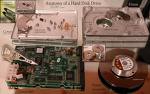

fig. Inside the hard disk
fig. A hard disk